From Text to Binary and Back
Understanding data beyond JSON in JS

Throughout my career I have seen these APIs and data structures in many different use cases without really understanding what they were doing. I have worked periodically with pdf creation and pdf content extraction and I had to always use some strange data structures to get what I needed. Very recently I had to work with these mysterious APIs and structures again and I realized that this was something that was going to hunt me for the rest of my career. So I decided to finally roll up my sleeves and understand it better.
Everything starts with binary
As you probably already know computers store everything (text, images, videos, etc) in binary. That is, they store everything with 1s and 0s. That is the computers’ language. When we talk about working with raw data we are saying we are working with binary data.
hello -> Text (human language)

01001000 01100101 01101100 01101100 01101111 -> hello in binary
JS uses a raw binary container called ArrayBuffer to represent binary. Since JS is a high-level language, it does not allow you to access the bytes of an ArrayBuffer without using special tools. To be able to read and update binary data in JS we need Typed Arrays.
Working with Typed Arrays
Typed arrays are the tool we need to be able to read and write data from and to an ArrayBuffer. Depending on your need you would use a specific typed array. Generally speaking you have signed integer typed arrays, which cover ranges from negative to positive values (e.g Int8Array) and unsigned integer typed arrays, which only cover positive ranges (e.g Uint8Array). You also depend on the size of data you are working with. You can have 8, 16 and 32 bit signed and unsigned integer arrays and 32 and 64 bit float arrays.
const binary = new ArrayBuffer(4);
console.log(binary) // []

const uint8Array = new Uint8Array(binary);
console.log(uint8Array); //[0,0,0,0] - Initial binary data

// Now let's try to modify ArrayBuffer directly
binary[0] = 72;
console.log(uint8Array); //[0,0,0,0]

// Now modify using Uint8Array
uint8Array[0] = 72;
console.log(uint8Array); //[72,0,0,0]
The example above shows how you cannot read or update binary in JS without using typed arrays. Think of typed arrays as special lenses you need to be able to see a particular set of data. In our previous example the constant binary would have a structure like this:
[ 00000000 ][ 00000000 ][ 00000000 ][ 00000000 ] // 4 bytesIf we use a “UInt8Array” lens what we are saying is: “Group those bits in groups of 8 and read each group as an integer from 0 to 255 (the range of a UInt8Array)”. So what you would end up having is something like:
Uint8Array { 0: 0, 1: 0, 2: 0, 3: 0 } If you were to use a Uint16Array instead you would group those bits in groups of 16 like this:
[ 00000000 00000000 ][ 00000000 00000000 ]And you would get something like:
Uint16Array { 0: 0, 1: 0 } How Text Gets In
Now that we have covered the basics it is time to understand the flow of how text gets converted to bytes and back. JS provides us with an interface called TextEncoder to be able to translate human readable text into bytes. The TextEncoder does this by implementing its encode method. This method takes a string as its only parameter and returns a Uint8Array of UTF-8 encoded text.
If you get confused about what UTF-8 is and how does it relate to typed arrays you are not alone. A typed array tells you how to read the raw bytes in memory (in this case, as 8-bit unsigned integers (0–255)). That works perfectly for UTF-8 encoded text because UTF-8 also operates at the byte level.
UTF-8 itself is a text encoding format and what it tells you is how to represent characters (like H, é, or 😊) as a series of one or more bytes. In our earlier example, each number in the Uint8Array represents one byte of UTF-8 data. So UTF-8 is the map, and the array of bytes is the route you follow to reconstruct the original string.
You have probably heard of other encodings like UTF-16 or ASCII. These are just alternative maps for translating characters into bytes.
Since the TextEncoder returns a Uint8Array we know that it is basically representing an ArrayBuffer and giving us a way of reading its content and of updating it.
const myString = "Hello";

const textEncoder = new TextEncoder();
const utf8Representation = textEncoder.encode(myString);

console.log(utf8Representation);
//{ 0: 72, 1: 101, 2: 108, 3: 108, 4: 111 }
// Where 72 is H, 101 is e, 108 is l and 111 is o in UTF-8 format
Now, that is something our computer can understand!
How Text Gets Out
Similarly, JS provides us with a decoding interface called TextDecoder. As you could have guessed, the TextDecoder does exactly the opposite as the TextEncoder. It uses its decode method to get a string (in human readable form) from a stream of bytes, or ArrayBuffer with any representation (e.g. UTF-8).
const utf8Decoder = new TextDecoder('utf-8');

const uint8Array = new Uint8Array([72, 101, 108, 108, 111])
const decodedString = utf8Decoder.decode(uint8Array);

console.log(decodedString); //"Hello"
Even though this seems trivial, you need to know the encoding format (UTF-8, UTF-16, etc) and the byte structure (Uint8Array, Uint16Array, etc) to be able to decode the bytes properly, though in most practical cases, UTF-8 and Uint8Array are the default and safest combination. I invite you to try the above code just changing the utf-8 for utf-16 or Uint8Array for Uint16Array. You will often get incorrect output (or decoding errors, depending on the format mismatch).
A supermarket analogy
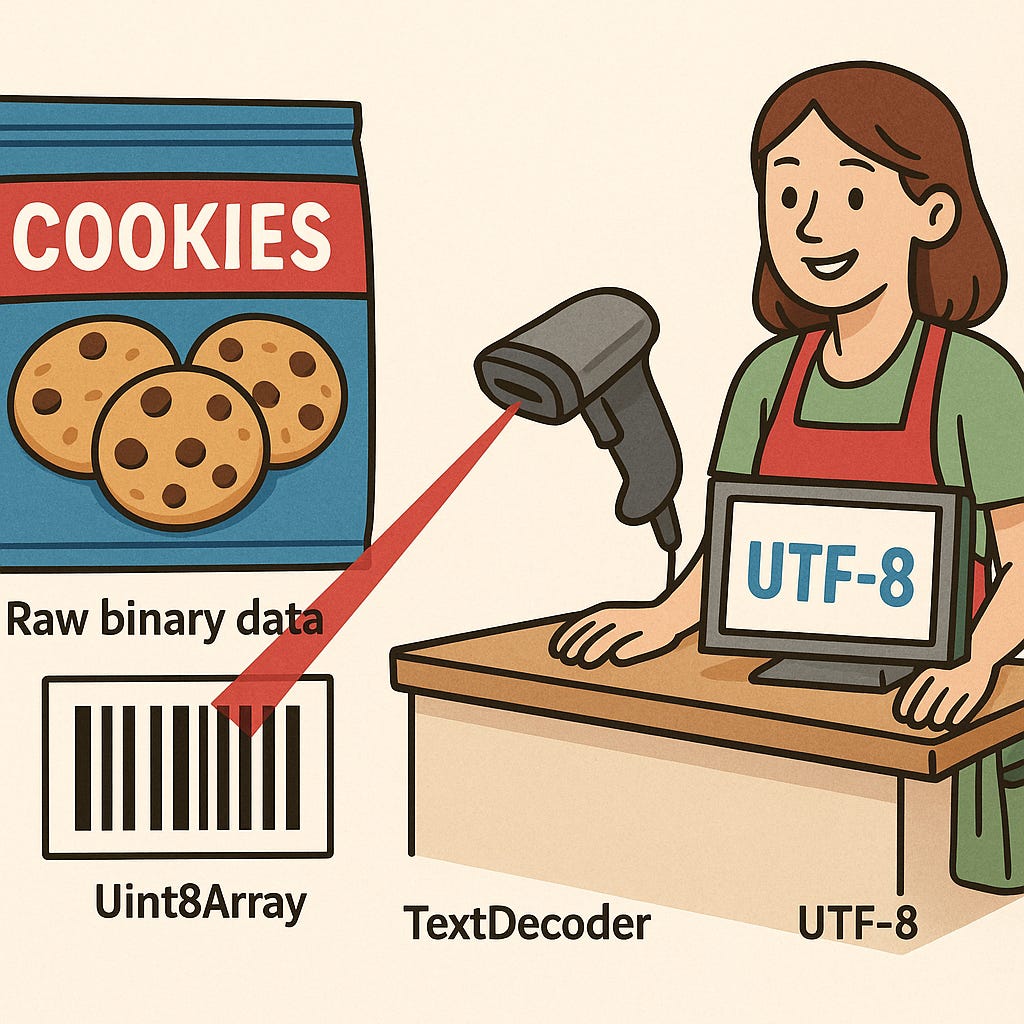
Let’s pause here for a moment and try to digest all these new concepts first, before we move on. Let’s look at this process as something similar to what you see in a supermarket:
Some cookies would be the raw binary data.
The package that contains the cookies would be the ArrayBuffers (You can’t see the cookies).
The barcode in the package would be the Uint8Array (which gives you a numerical way to identify what is inside the package)
The scanner at the cashier would be the TextDecoder
The software that translate the barcode to human readable content would be UTF-8
Not everything is text
At this point, we understand how to convert text into binary and vice versa. But what if what we are dealing with is not text? What if it is an image, a pdf or an audio? You would probably get pure nonesense if you try to decode the binary with the TextDecoder. So what should we use if we are handling something other than text? This is where the Blob comes in.
A Blob (short for Binary Large OBject) represents binary data as an immutable file-like object. As a matter of fact, the File class extends from the Blob and adds some more metadata. While an ArrayBuffer helps you have some low-level control over binary content, a Blob’s job is to wrap and transfer binary data. A Blob is ideal to send, preview or download binary content.
const imageBlob = new Blob([arrayBuffer], { type: 'image/png' });
const url = URL.createObjectURL(imageBlob);
document.querySelector('img').src = url;
This takes binary data (e.g., fetched from a server) and wraps it in a Blob.
Moving and storing binary in text-only systems
Sometimes you’re working in systems that only accept plain text. In those cases, you might not be able to just use an ArrayBuffer or Blob. In cases like these you might want to convert your binary content to Base64.
Base64 is a way of encoding binary data as plain text using only ASCII characters. It ensures your binary data transfers safely without corruption. It is worth noting that when converting to Base64 your data becomes around 33% bigger. Therefore, make sure you are using it for compatibility purposes and not for performance.
Some use cases for converting binary to Base64 are:
Embedding images or files in JSON
Sending attachments in emails (MIME format)
Embedding an image into HTML directly instead of pointing to an image URI
Newer APIs like Uint8Array.prototype.toBase64() are part of an upcoming standard and are only supported in some browsers like Safari and Firefox. In most environments, you’ll still need to use btoa() (for encoding) and atob() (for decoding). These are older, browser-only methods with limitations (for example, they don’t work in Node.js and only handle ASCII-safe strings).
const someImageBinary = new Uint8Array([0x89, 0x50, 0x4E, 0x47, ...]);

function uint8ToBase64(uint8) {
  let binary = '';
  for (let i = 0; i < uint8.length; i++) {
    binary += String.fromCharCode(uint8[i]);
  }
  return btoa(binary);
}

const imageInBase64 = uint8ToBase64(someImageBinary);

const dataURI = `data:image/png;base64,${imageInBase64}`;

console.log(dataURI);
//'data:image/png;base64,iVBORw0K...'
Note: If you need to embed a base64 string you might need to create a Data URI manually like in the example
Conclusion
I spent years ignoring these tools because I didn’t know what they were really doing. Now that I understand them, I see how powerful they are and how often they show up in places I never expected. If you are working with binary, text, files or just weird browser APIs, understanding this layer can save you hours (or even days).